
Enterprise AI Solutions: A Complete Buyer’s Guide
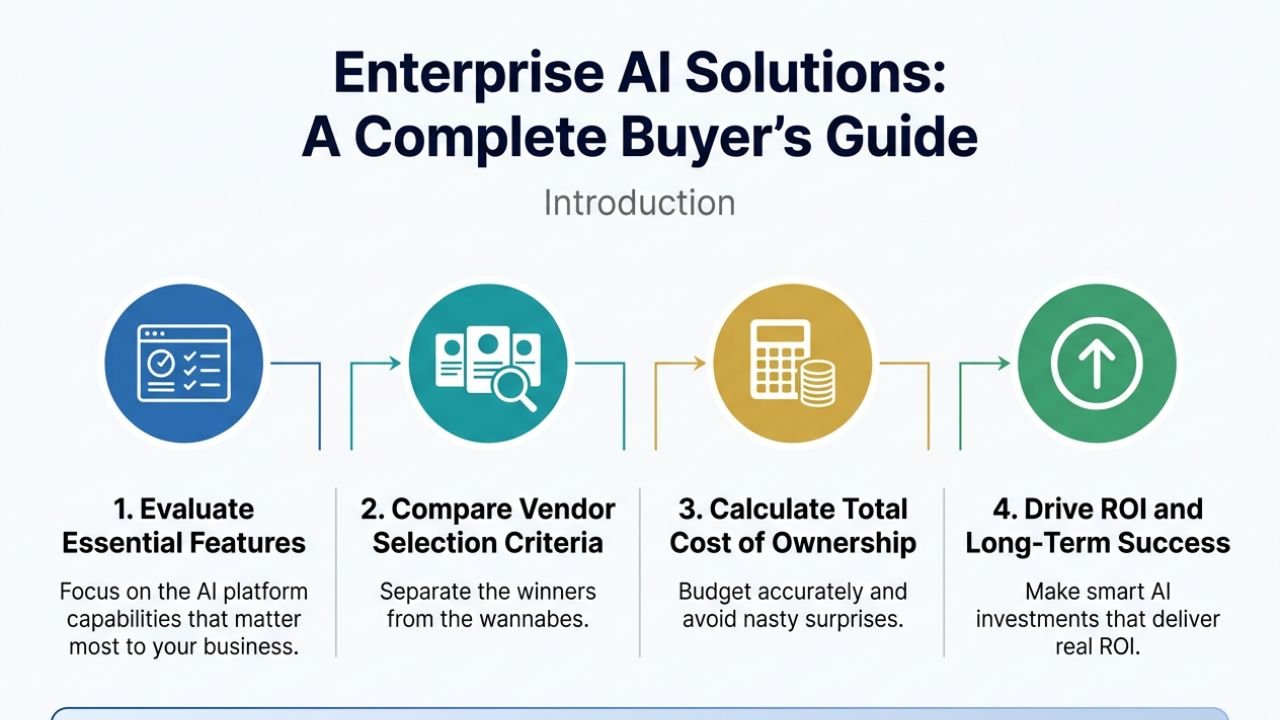
Choosing the right Enterprise AI Solutions can make or break your company’s digital transformation efforts. This guide helps C-suite executives, IT directors, and procurement teams navigate the complex AI vendor landscape with confidence.
You’ll learn how to evaluate AI platforms based on essential features that actually matter for your business. We’ll walk you through proven vendor selection criteria that separate the winners from the wannabes. Plus, you’ll discover how to calculate the true total cost of ownership so you can budget accurately and avoid nasty surprises down the road.
By the end of this guide, you’ll have a clear framework for making smart AI investments that deliver real ROI and position your organization for long-term success.
Understanding Enterprise AI Solutions and Their Business Impact
Defining Enterprise AI vs Traditional Software Solutions
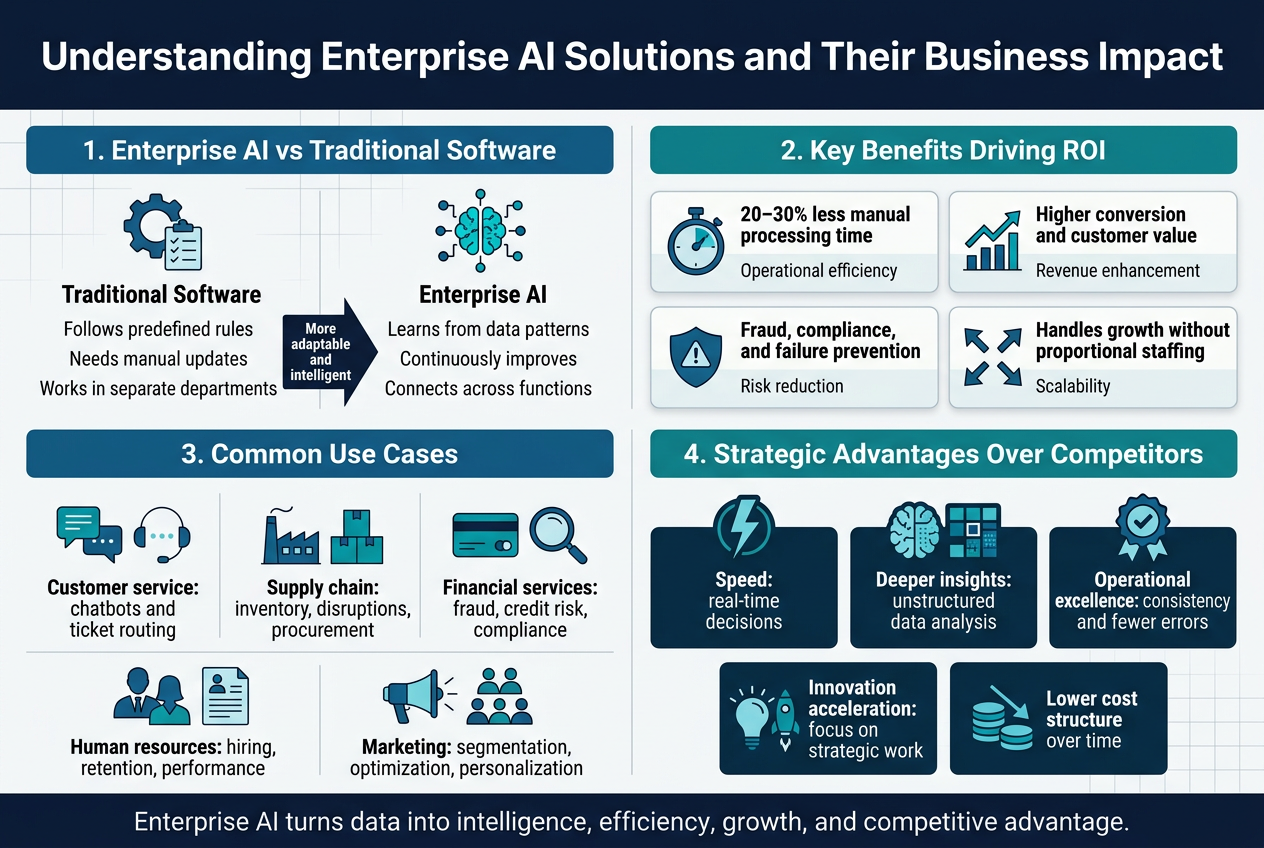
Enterprise AI solutions represent a fundamental shift from traditional software approaches. While conventional business software follows predetermined logic and rules, AI systems learn from data patterns and make intelligent decisions without explicit programming. Think of traditional CRM software that tracks customer interactions versus an AI-powered system that predicts which customers are likely to churn and recommends specific retention strategies.
The key difference lies in adaptability and intelligence. Traditional enterprise software requires manual updates and configuration changes to handle new scenarios. AI solutions continuously evolve, improving their accuracy and capabilities as they process more data. This means your investment becomes more valuable over time rather than requiring constant maintenance and upgrades.
Enterprise AI also differs in scope and integration capabilities. These platforms typically connect multiple business functions, breaking down data silos that plague traditional departmental software solutions. Instead of having separate tools for sales, marketing, operations, and finance, AI platforms create unified intelligence across your entire organization.
Key Benefits That Drive ROI for Large Organizations
The financial impact of enterprise AI extends far beyond cost savings. Organizations typically see immediate improvements in operational efficiency, with many reporting 20-30% reductions in manual processing time within the first six months of implementation. This efficiency gain translates directly to bottom-line improvements through reduced labor costs and faster decision-making cycles.
Revenue enhancement represents another significant ROI driver. AI-powered customer insights enable more targeted marketing campaigns, resulting in higher conversion rates and increased customer lifetime value. Sales teams equipped with AI-driven lead scoring and opportunity analysis close deals faster and focus their efforts on the highest-value prospects.
Risk reduction provides substantial long-term value that’s often overlooked in ROI calculations. AI systems excel at identifying patterns that humans miss, helping organizations avoid costly compliance violations, fraud, and operational failures. The financial protection from preventing just one major incident often justifies the entire AI investment.
Scalability benefits become increasingly valuable as organizations grow. AI solutions handle increased data volumes and complexity without proportional increases in staffing requirements. This means your AI investment continues delivering value even as your business expands into new markets or product lines.
Common Use Cases Across Industries and Departments
Customer service transformation leads many AI implementations, with intelligent chatbots and automated ticket routing reducing response times while improving customer satisfaction. These systems handle routine inquiries automatically while escalating complex issues to human agents with complete context and recommended solutions.
Supply chain optimization represents another high-impact application area. AI algorithms analyze demand patterns, supplier performance, and market conditions to optimize inventory levels, predict disruptions, and automate procurement decisions. Manufacturing companies use these insights to reduce waste and improve production planning accuracy.
Financial services leverage AI for fraud detection, credit risk assessment, and regulatory compliance monitoring. These applications process thousands of transactions per second, identifying suspicious patterns that would be impossible for human analysts to detect manually.
Human resources departments use AI for talent acquisition, employee retention analysis, and performance management. AI systems screen resumes, identify high-potential candidates, and predict which employees might be considering other opportunities.
Marketing teams rely on AI for customer segmentation, campaign optimization, and content personalization. These tools analyze customer behavior across multiple channels to deliver targeted messages at optimal times through preferred communication methods.
Strategic Advantages Over Competitors
Speed becomes a critical competitive differentiator when AI enables real-time decision-making. While competitors spend weeks analyzing market data and developing responses, AI-powered organizations identify opportunities and threats within hours. This agility proves especially valuable in rapidly changing markets where first-mover advantages determine long-term success.
Data-driven insights provide deeper customer understanding than traditional analytics approaches. AI systems process unstructured data from social media, customer support interactions, and behavioral patterns to reveal preferences and trends that aren’t visible through conventional reporting. This intelligence enables more accurate product development and market positioning decisions.
Operational excellence emerges naturally from AI-optimized processes. Organizations achieve consistency levels that manual operations cannot match, reducing errors and improving quality metrics. This reliability becomes a significant competitive advantage, especially in industries where customer trust and operational precision drive market share.
Innovation acceleration occurs when AI frees human talent from routine tasks, allowing teams to focus on strategic initiatives and creative problem-solving. Organizations report that AI implementation leads to higher employee satisfaction and retention as workers engage in more meaningful, high-value activities.
Cost structure advantages compound over time as AI systems become more efficient while competitor costs continue rising. This economic moat becomes particularly valuable in price-sensitive markets where marginal cost advantages translate to significant market share gains.
Essential Features to Evaluate in Enterprise AI Platforms
Scalability and Performance Capabilities
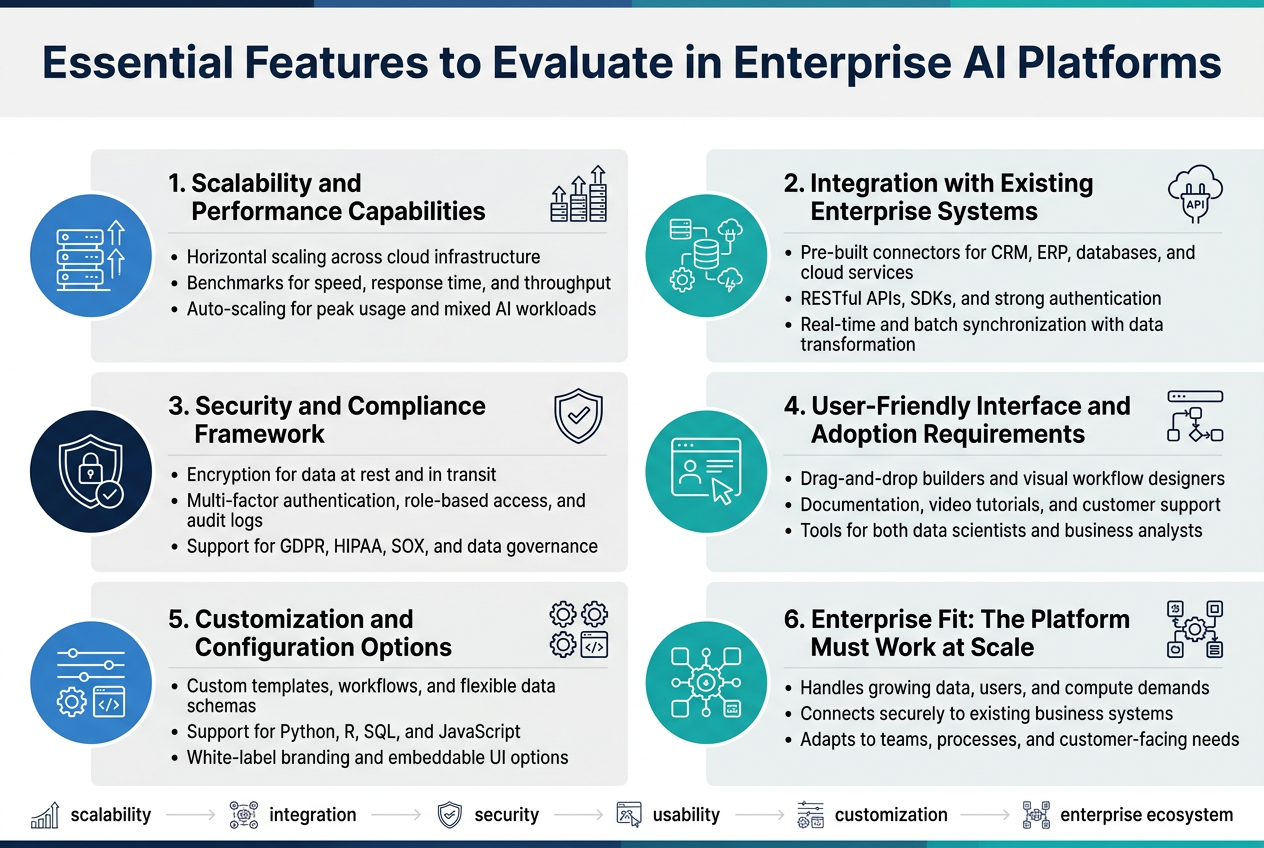
The ability to scale becomes the backbone of any enterprise AI solution worth your investment. Your chosen platform should handle increasing data volumes, user loads, and computational demands without breaking a sweat. Look for solutions that offer horizontal scaling across cloud infrastructure, allowing you to add resources as your business grows.
Performance benchmarks matter more than marketing promises. Request specific metrics around processing speeds, response times, and throughput capabilities under various load conditions. The platform should maintain consistent performance even when dealing with massive datasets or complex machine learning models. Auto-scaling features save you from manual intervention during peak usage periods.
Consider how the platform handles different types of AI workloads simultaneously. Your organization might run predictive analytics, natural language processing, and computer vision tasks concurrently. The solution should allocate resources efficiently across these diverse requirements without creating bottlenecks.
Integration with Existing Enterprise Systems
Your AI platform needs to play well with your current technology stack. Seamless integration prevents data silos and reduces the complexity of your IT environment. Check for pre-built connectors to popular enterprise software like CRM systems, ERP platforms, databases, and cloud services.
API quality determines how smoothly integration will proceed. Look for RESTful APIs with comprehensive documentation, SDKs in multiple programming languages, and robust authentication mechanisms. The platform should support both real-time and batch data synchronization methods.
Data pipeline capabilities become critical when connecting multiple systems. The AI solution should handle data transformation, cleaning, and formatting automatically as information flows between different applications. This reduces the manual work required from your technical teams and minimizes errors during data transfer.
Security and Compliance Framework
Security features can’t be an afterthought when dealing with enterprise data. The platform should offer end-to-end encryption for data at rest and in transit. Multi-factor authentication, role-based access controls, and audit logging capabilities provide essential security layers for your AI operations.
Compliance requirements vary by industry, but your chosen solution should support major standards like GDPR, HIPAA, SOX, and industry-specific regulations. Built-in compliance reporting features save time during audits and help maintain ongoing adherence to regulatory requirements.
Data governance tools within the platform help you track data lineage, manage user permissions, and implement data retention policies. These features become increasingly important as AI models process sensitive information across different departments and geographic locations.
User-Friendly Interface and Adoption Requirements
The best AI platform becomes worthless if your team can’t use it effectively. Look for intuitive interfaces that don’t require extensive technical training. Drag-and-drop model builders, visual workflow designers, and pre-configured templates help business users create AI applications without coding expertise.
Training and support resources directly impact adoption rates. Comprehensive documentation, video tutorials, and responsive customer support reduce the learning curve for your team. Some platforms offer certification programs that help build internal expertise.
Consider the different user personas within your organization. Data scientists need advanced model development tools, while business analysts require simplified reporting dashboards. The platform should cater to various skill levels without compromising functionality for power users.
Customization and Configuration Options
Every organization has unique requirements that off-the-shelf solutions might not address. Your AI platform should offer extensive customization options without requiring complete rebuilds. Custom model templates, configurable workflows, and flexible data schemas allow you to adapt the solution to your specific business processes.
The development environment should support popular programming languages and frameworks used by your technical team. Python, R, SQL, and JavaScript support enables your developers to work with familiar tools while leveraging the platform’s capabilities.
White-label options become important if you plan to embed AI capabilities into customer-facing applications. The ability to customize the user interface, branding elements, and functionality helps maintain a consistent experience across your product ecosystem.
Critical Vendor Selection Criteria
Vendor Financial Stability and Market Position
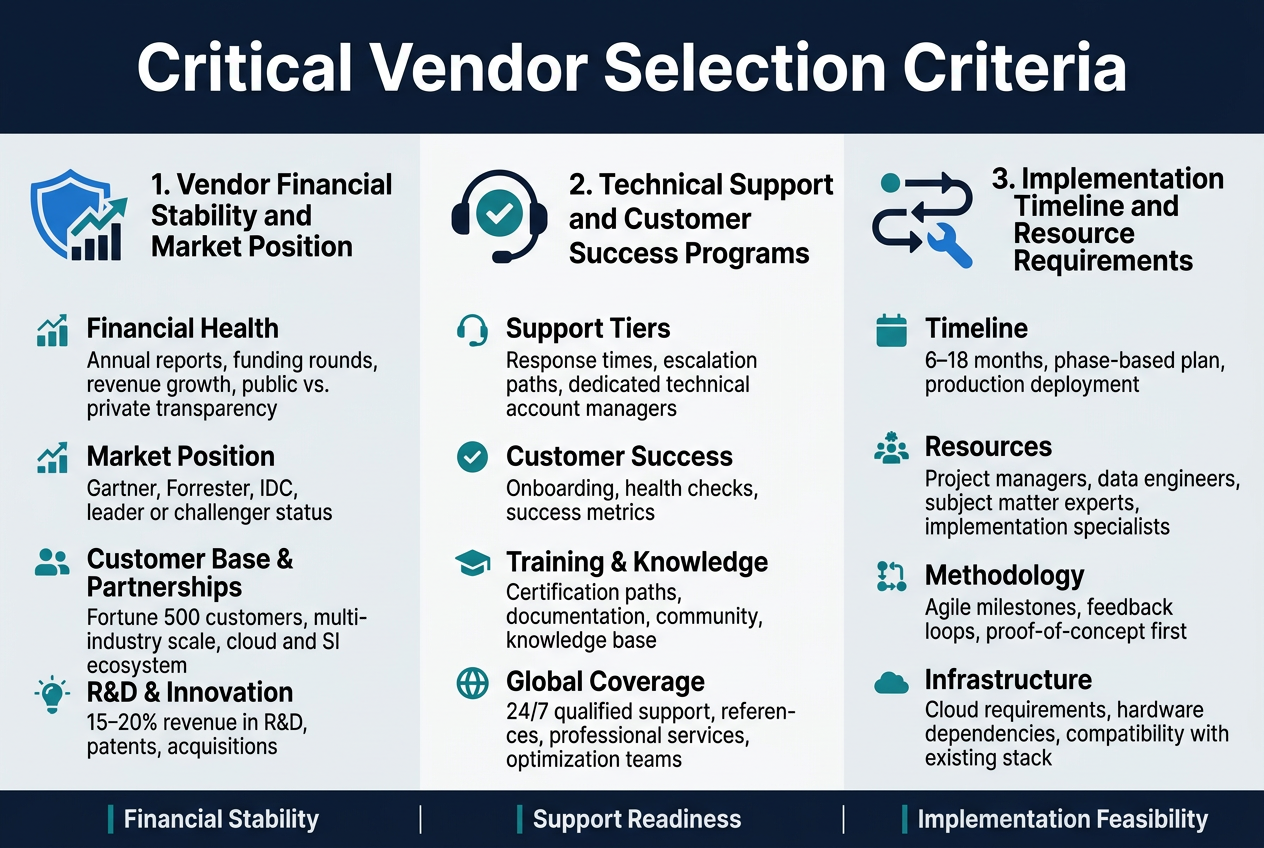
When you’re investing millions in enterprise AI, the last thing you want is to partner with a vendor that might disappear overnight. Start by examining the vendor’s financial health through their annual reports, funding rounds, and revenue growth patterns. Public companies offer more transparency, while private companies require deeper digging into their funding history and investor backing.
Market position tells you how the vendor stacks up against competitors. Look at analyst reports from Gartner, Forrester, or IDC to understand where they rank in magic quadrants and wave reports. A vendor consistently positioned as a leader or challenger typically indicates stronger long-term viability than those in niche or visionary categories.
Check their customer base size and diversity. Vendors serving Fortune 500 companies across multiple industries demonstrate proven scalability and market acceptance. Review their partnership ecosystem – strong relationships with cloud providers, system integrators, and technology vendors signal market confidence and expanded support resources.
Pay attention to their research and development investments. Companies allocating 15-20% of revenue to R&D typically keep pace with technological advancement. Review their patent portfolio and recent acquisitions to gauge innovation capabilities and strategic direction.
Technical Support and Customer Success Programs
Enterprise AI implementations demand robust support structures that go beyond basic help desk services. Evaluate the vendor’s support tiers, response time commitments, and escalation procedures. Look for dedicated technical account managers who understand your specific use cases and can provide proactive guidance.
Examine their customer success methodology. Top-tier vendors offer structured onboarding programs, regular health checks, and success metrics tracking. They should provide training programs for your technical teams, including certification paths and ongoing education resources. Ask about user communities, documentation quality, and knowledge base accessibility.
Review their global support coverage, especially if you operate across multiple time zones. Twenty-four-hour support isn’t just about availability – it’s about having qualified engineers who can handle complex technical issues regardless of when they arise. Request references from customers with similar geographic footprints and technical requirements.
Consider their professional services capabilities. While some vendors excel at software but lack implementation expertise, others offer comprehensive consulting services. Understand what’s included in standard support versus what requires additional fees. Some vendors provide dedicated success teams that monitor your AI model performance and suggest optimizations.
Implementation Timeline and Resource Requirements
Realistic timeline expectations prevent project delays and budget overruns. Request detailed implementation plans that break down each phase, from initial setup through production deployment. Typical enterprise AI implementations range from six to eighteen months, depending on complexity and integration requirements.
Understand the resource commitments from both sides. Your organization needs dedicated project managers, data engineers, and subject matter experts. The vendor should assign experienced implementation specialists who’ve handled similar deployments. Clarify who handles data preparation, model training, integration work, and user training.
Evaluate their implementation methodology. Agile approaches with regular milestones and feedback loops typically produce better outcomes than rigid waterfall methods. Look for vendors who emphasize proof-of-concept phases before full deployment, allowing you to validate results early and adjust course if needed.
Consider infrastructure requirements and dependencies. Some vendors require specific cloud environments or hardware configurations that could impact your timeline. Understanding these requirements upfront helps you plan procurement and avoid delays. Ask about their experience with your existing technology stack and any potential compatibility issues that could extend implementation schedules.
Total Cost of Ownership Analysis
Licensing Models and Pricing Structures
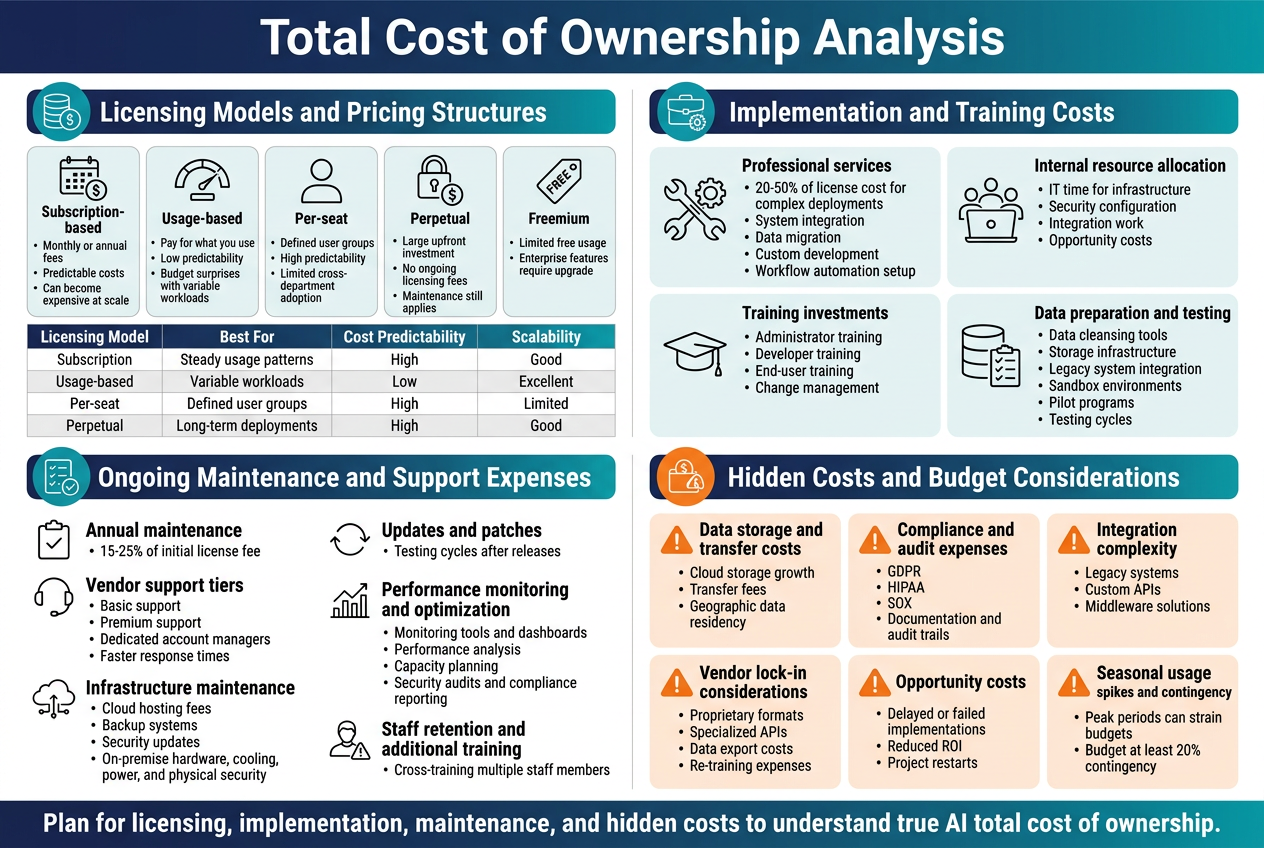
Enterprise AI vendors typically offer several licensing models, each with distinct cost implications. Subscription-based models charge monthly or annual fees based on usage metrics like data volume, API calls, or number of users. This approach provides predictable costs but can become expensive as your organization scales. Per-seat licensing works well for tools with defined user bases but may limit adoption across departments.
Usage-based pricing ties costs directly to consumption – you pay for what you use. While this seems cost-effective initially, unpredictable workloads can lead to budget surprises. Some vendors offer hybrid models combining base subscriptions with usage overages, providing both predictability and flexibility.
Perpetual licenses require larger upfront investments but eliminate ongoing licensing fees. However, you’ll still face maintenance and support costs. Freemium models allow limited free usage but enterprise features typically require paid upgrades.
Key pricing factors include:
- Data processing volume
- Number of simultaneous users
- API call limits
- Storage requirements
- Advanced features and integrations
- Geographic deployment regions
| Licensing Model | Best For | Cost Predictability | Scalability |
|---|---|---|---|
| Subscription | Steady usage patterns | High | Good |
| Usage-based | Variable workloads | Low | Excellent |
| Per-seat | Defined user groups | High | Limited |
| Perpetual | Long-term deployments | High | Good |
Implementation and Training Costs
Implementation expenses often exceed initial licensing costs. Professional services from vendors typically range from 20-50% of the license cost for complex deployments. These services include system integration, data migration, custom development, and workflow automation setup.
Internal resource allocation represents a significant cost factor. Your IT team will spend considerable time on infrastructure preparation, security configuration, and integration work. Factor in opportunity costs – time spent on AI implementation means other projects get delayed.
Training investments are crucial for success. Technical staff need platform-specific training, while end-users require workflow training. Consider these training categories:
- Administrator training: System configuration, user management, security protocols
- Developer training: API integration, custom model development, troubleshooting
- End-user training: Interface navigation, best practices, compliance requirements
- Change management: Helping teams adapt to new AI-powered workflows
Data preparation costs are often underestimated. Clean, structured data is essential for AI success. Budget for data cleansing tools, storage infrastructure, and staff time for data organization. Legacy system integration may require custom connectors or middleware solutions.
Testing and validation phases need dedicated resources. Plan for sandbox environments, pilot programs, and extensive testing cycles before full deployment.
Ongoing Maintenance and Support Expenses
Annual maintenance typically costs 15-25% of the initial license fee. Vendor support tiers vary significantly in scope and responsiveness. Premium support includes dedicated account managers, faster response times, and proactive monitoring but costs substantially more than basic support.
Infrastructure maintenance includes cloud hosting fees, backup systems, and security updates. Cloud-based solutions shift these costs to operational expenses but provide better scalability. On-premise deployments require dedicated hardware, cooling, power, and physical security.
Regular updates and patches keep systems secure and performant. Budget for testing cycles when updates are released, as changes may affect existing integrations or workflows.
Performance monitoring and optimization requires ongoing attention. As data volumes grow and usage patterns change, systems may need tuning or scaling. Consider costs for:
- Monitoring tools and dashboards
- Performance analysis and optimization
- Capacity planning and scaling
- Security audits and compliance reporting
Staff retention and additional training become ongoing expenses as team members change roles or new features are released. Cross-training multiple staff members prevents single points of failure.
Hidden Costs and Budget Considerations
Data storage and transfer costs can escalate quickly, especially with cloud-based solutions. Large datasets require substantial storage, and frequent data movement between systems incurs transfer fees. Geographic data residency requirements may force you into more expensive hosting regions.
Compliance and audit expenses are often overlooked. Regulated industries face additional costs for documentation, audit trails, and compliance reporting. GDPR, HIPAA, or SOX requirements may necessitate specialized configurations or third-party compliance tools.
Integration complexity drives unexpected costs. Legacy systems may need custom APIs or middleware solutions. Each additional integration point increases maintenance overhead and potential failure points.
Vendor lock-in considerations affect long-term costs. Proprietary formats or specialized APIs make switching vendors expensive. Factor in data export costs and re-training expenses when evaluating vendor options.
Opportunity costs from delayed or failed implementations can dwarf direct expenses. Poor vendor selection or inadequate planning can result in project delays, reduced ROI, or complete restarts.
Seasonal usage spikes in usage-based pricing models can strain budgets. Plan for peak periods and consider whether flat-rate alternatives might be more cost-effective during high-demand seasons.
Budget for contingency expenses of at least 20% above projected costs. AI projects frequently encounter unexpected technical challenges, scope changes, or integration hurdles that require additional investment.
Implementation Planning and Risk Management
Creating a Successful Deployment Roadmap
A solid deployment roadmap serves as your GPS for navigating the complex journey from AI solution selection to full operational deployment. Start by breaking down your implementation into distinct phases, typically spanning 6-18 months depending on solution complexity and organizational readiness.
Phase one should focus on infrastructure preparation and pilot testing with a small user group. This allows you to identify technical hurdles early and refine your approach before broader rollout. Select a specific business use case that offers clear value but has manageable scope – think customer service chatbots for a single department rather than enterprise-wide automation.
Map out technical dependencies carefully. Your AI solution will likely need integration with existing systems like CRM platforms, databases, or analytics tools. Create a detailed timeline that accounts for data preparation, system integrations, and testing cycles. Build in buffer time – AI projects commonly experience delays due to data quality issues or unexpected integration challenges.
Establish clear milestones and success criteria for each phase. These should include both technical benchmarks (system uptime, response times) and business metrics (user adoption rates, process efficiency gains). Regular checkpoint reviews help catch problems early and allow for course corrections without derailing the entire project.
Change Management and User Adoption Strategies
User resistance can kill even the most technically sound AI implementation. People naturally fear that AI will replace their jobs or make their skills obsolete. Address these concerns head-on through transparent communication about how AI will augment rather than replace human capabilities.
Start building excitement early by involving key stakeholders in the selection process. When employees feel they have a voice in choosing the solution, they’re more likely to embrace it. Identify AI champions within each department – these are typically tech-savvy employees who can help their colleagues navigate the new system and troubleshoot basic issues.
Design comprehensive training programs that go beyond just showing people which buttons to click. Help users understand how AI works, what it can and cannot do, and how it will make their jobs easier or more interesting. Create role-specific training materials that show concrete examples of how AI will help each person accomplish their daily tasks.
Consider implementing a “crawl, walk, run” approach. Begin with AI handling simple, routine tasks while employees maintain control over complex decisions. Gradually expand AI capabilities as users become more comfortable and trust in the system grows. This staged approach reduces anxiety and allows people to experience AI’s benefits firsthand.
Data Migration and Integration Challenges
Data migration represents one of the biggest stumbling blocks in AI implementations. Your AI system is only as good as the data it receives, and most organizations discover their data isn’t as clean or accessible as they initially believed.
Start with a thorough data audit to identify where your information lives, what format it’s in, and how current it is. You’ll likely find data scattered across multiple systems, stored in different formats, with varying levels of quality. Customer information might exist in your CRM, email marketing platform, and billing system – each with slightly different versions of the same records.
Establish data governance protocols before beginning migration. Define data ownership, quality standards, and update procedures. Assign specific individuals responsibility for maintaining data accuracy in each source system. Without clear governance, even the best AI solution will struggle with inconsistent or outdated information.
Plan for data standardization and cleansing as separate project phases. This often takes longer than expected, especially if you discover duplicate records, missing fields, or incompatible data formats. Consider investing in data preparation tools that can automate much of the cleansing process, but budget time for manual review of critical records.
Performance Monitoring and Success Metrics
Measuring AI performance requires both technical and business metrics. Technical metrics like response time, accuracy rates, and system availability tell you if the solution is working properly. Business metrics like cost savings, productivity gains, and customer satisfaction scores show whether AI is delivering the promised value.
Create dashboards that track key performance indicators in real-time. These should be accessible to both technical teams and business stakeholders, with different views tailored to each audience’s needs. Technical teams need detailed performance logs and error reports, while executives want high-level trends and ROI calculations.
Establish baseline measurements before AI implementation so you can accurately measure improvement. If you’re implementing AI for customer service, capture current metrics like average response time, resolution rates, and customer satisfaction scores. Track these same metrics post-implementation to quantify AI’s impact.
Don’t just measure what’s easy to count – focus on metrics that align with your original business objectives. If you implemented AI to improve customer experience, monitor Net Promoter Scores and customer retention rates, not just technical performance metrics. Review and adjust your measurement strategy quarterly as you learn more about AI’s impact on your business operations.
Set up automated alerts for performance degradation. AI systems can drift over time as data patterns change, so continuous monitoring helps catch issues before they impact users or business outcomes.
Making the Final Decision and Ensuring Long-term Success
Vendor Negotiation Strategies and Contract Terms
Getting the best deal from your AI vendor requires strategic preparation. Start by documenting all requirements, performance benchmarks, and success metrics before entering negotiations. This gives you leverage and prevents scope creep later. Create a comparison matrix of competing vendors to strengthen your position during price discussions.
Focus negotiations on value, not just cost. Push for flexible pricing models that scale with your usage and success. Many vendors offer consumption-based pricing, which can significantly reduce initial investments while providing growth runway. Request volume discounts for multi-year commitments, but ensure escape clauses if performance targets aren’t met.
Key contract terms deserve special attention:
- Service Level Agreements (SLAs): Define specific uptime guarantees (typically 99.5% minimum), response times for support tickets, and performance benchmarks
- Data ownership and portability: Ensure you retain full ownership of your data and can export it in standard formats
- Intellectual property rights: Clarify ownership of custom models, algorithms, and insights generated from your data
- Termination clauses: Include reasonable notice periods and data retrieval guarantees
- Liability and indemnification: Understand vendor responsibilities for data breaches, system failures, and compliance violations
Negotiate phased implementation milestones with payment tied to deliverable completion. This protects your investment and ensures vendor accountability. Include penalty clauses for missed deadlines and performance guarantees with remedy options.
Pilot Program Best Practices
Running a successful pilot program sets the foundation for enterprise-wide AI deployment. Choose a use case that’s meaningful but contained – something that can demonstrate clear value without overwhelming your organization. The ideal pilot involves 50-200 users and runs for 3-6 months, providing enough time to see genuine results while maintaining momentum.
Define success criteria upfront with specific, measurable outcomes. Instead of vague goals like “improve efficiency,” set targets like “reduce processing time by 30%” or “increase prediction accuracy to 85%.” Share these metrics with all stakeholders to ensure alignment and manage expectations.
Create a diverse pilot team that includes both technical and business users. This combination helps identify real-world usability issues and ensures the solution meets actual business needs. Assign dedicated project managers and establish regular check-ins with executive sponsors to maintain visibility and support.
Build feedback loops into your pilot process:
- Weekly user surveys: Track satisfaction, ease of use, and perceived value
- Technical monitoring: Monitor system performance, integration issues, and data quality
- Business metrics: Measure impact on key performance indicators relevant to your use case
- Change management assessment: Document training needs, resistance points, and adoption patterns
Plan for potential roadblocks. Technical challenges like data integration issues or performance bottlenecks often emerge during pilots. Having contingency plans and vendor escalation paths ready keeps your project on track. Document everything – both successes and failures provide valuable insights for full-scale deployment.
Measuring ROI and Business Value
Calculating AI ROI goes beyond simple cost savings. Start with baseline measurements before implementation to establish clear benchmarks. Track both quantitative metrics like cost reduction, revenue increase, and efficiency gains, alongside qualitative benefits such as improved decision-making capabilities and employee satisfaction.
Develop a comprehensive measurement framework that captures multiple value dimensions:
| Value Category | Sample Metrics | Measurement Timeline |
|---|---|---|
| Direct Cost Savings | Labor cost reduction, operational efficiency | 3-6 months |
| Revenue Generation | New revenue streams, customer retention | 6-12 months |
| Risk Reduction | Compliance improvements, error prevention | 6-18 months |
| Strategic Benefits | Market insights, competitive advantage | 12-24 months |
Track leading and lagging indicators. Leading indicators like user adoption rates and system utilization provide early warning signs, while lagging indicators like customer satisfaction scores and financial impact show long-term success. This dual approach helps you course-correct quickly while building a compelling business case for continued investment.
Consider the compound effect of AI improvements. Unlike traditional technology investments with fixed returns, AI systems often get better over time through machine learning and increased data volumes. Factor this growth potential into your ROI calculations, but remain conservative in your projections.
Account for hidden costs in your calculations. Training expenses, change management efforts, and ongoing maintenance can significantly impact total ROI. Include these factors to present realistic expectations to leadership and secure appropriate budgets for long-term success.
Establish regular review cycles – quarterly business reviews work well for most organizations. These sessions should evaluate progress against original goals, identify new opportunities, and adjust strategies based on lessons learned. Success in AI isn’t just about hitting initial targets; it’s about building capabilities that drive continuous business value.
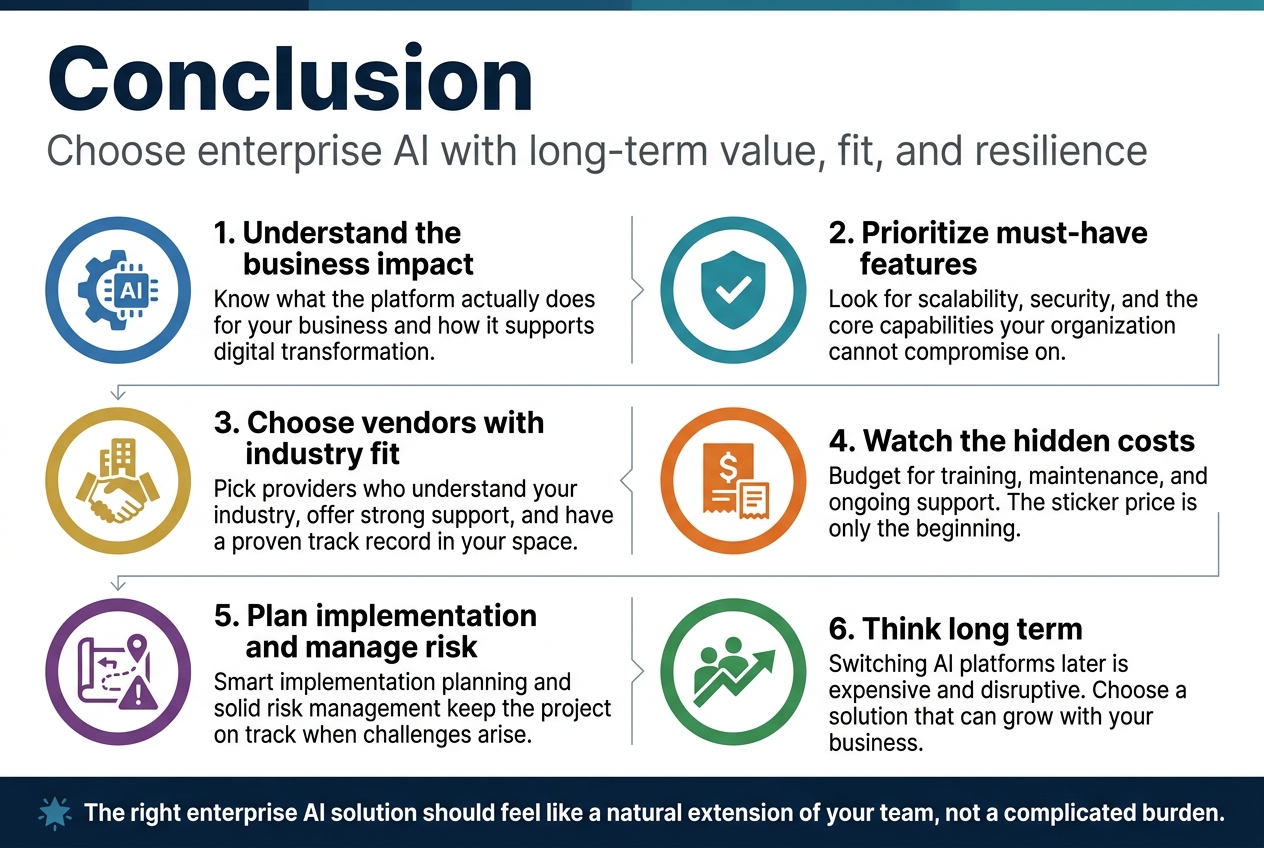
Enterprise AI is transforming how businesses operate, and choosing the right solution can make or break your digital transformation efforts. The key lies in understanding what these platforms actually do for your business, evaluating must-have features like scalability and security, and picking vendors who truly understand your industry. Don’t forget about the hidden costs that can sneak up on you – from training staff to ongoing maintenance – because the sticker price is just the beginning.
Smart implementation planning will save you headaches down the road, and having solid risk management strategies keeps your project on track when challenges arise. Take your time with this decision because switching AI platforms later is expensive and disruptive. Focus on vendors who offer strong support, have a proven track record in your space, and can grow with your business. The right enterprise AI solution should feel like a natural extension of your team, not a complicated burden that slows you down.